How do I get a PDF signed on my client's phone?
Upload your PDF, add your client's name and email, place the signature box on the page and press Send Link. SignZA emails your client, who signs on their phone with a finger. They do not need an account or an app, and you get the signed PDF back with a certificate page that shows who signed and when.
Steps
- On your dashboard, press Send Document.
- Drop in your PDF, or click to browse. It must be a PDF and no bigger than 10 MB.
- Check the Document name, then press Continue.
- Under Signer details, leave Email picked for how they receive the link, then type your client's first name, last name and email address and press Continue.
- On Options and review, press Send document. Nothing goes to your client yet.
- In the field editor, pick a box in the Add Field panel, then drag it out on the page where your client must sign.
- Press Send Link. SignZA emails your client.
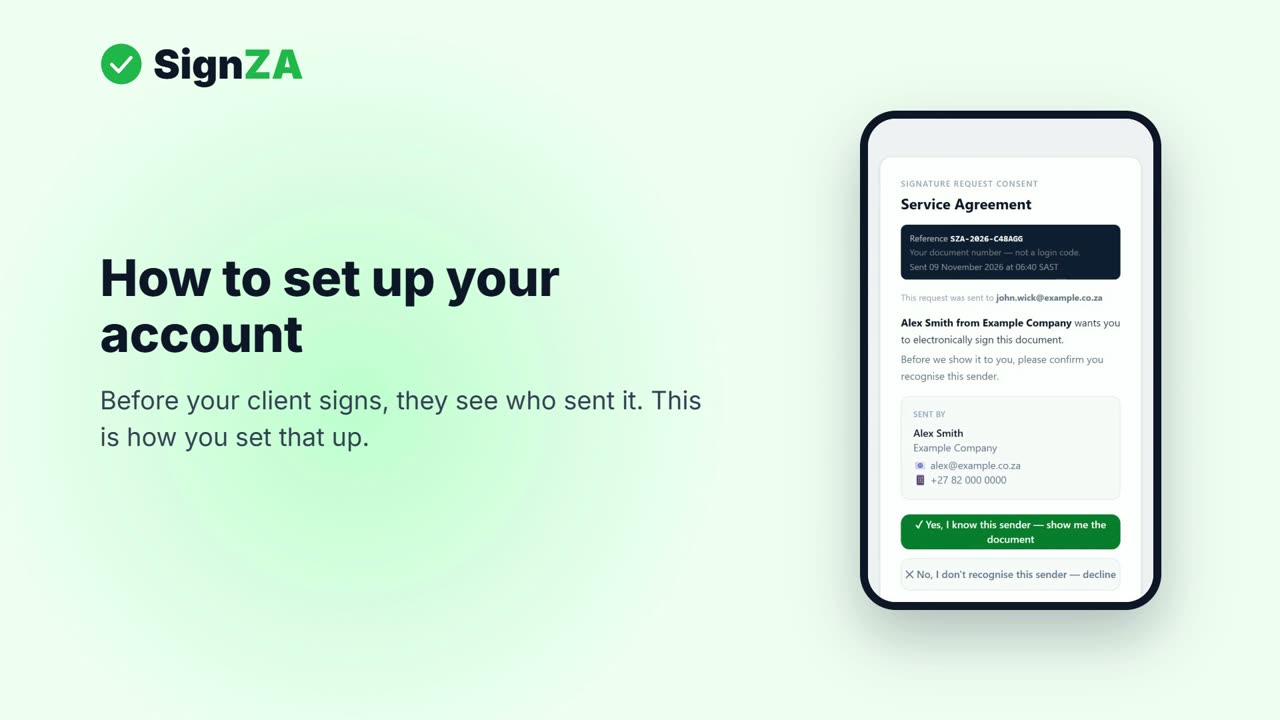
- Your client opens the email, checks who sent it and taps the green button.
- Your client draws their signature with a finger.
- Your client types their full name, ticks the box and taps Finish signing.
- Your dashboard shows the document as Signed, and the signed PDF comes back to you with a certificate page.
Good to know
- Your client does not need an account or an app to sign.
- Your client can sign from an email or from a WhatsApp message that you send from your own WhatsApp.
- The signed PDF has a certificate page that shows who signed and when.
- The Free plan lets you send 5 documents a month.
- Before your first send, SignZA asks for your name, company and mobile number in Settings.
Questions and answers
Does my client have to print anything?
No. Your client signs on their phone, so they do not have to print the document, sign it, scan it and send it back.
Can my client check the request is really from me?
Your client sees your name and details first, so they can check it is from you. They tap a green button to confirm before the document opens.
What kind of file can I send?
A PDF, up to 10 MB.
How do I know it has been signed?
Your dashboard shows the document as Signed, and the signed PDF comes back with a certificate page.
What if my client uses WhatsApp, not email?
Pick WhatsApp when you add their details. SignZA does not send the WhatsApp message itself. You get a Share Kit with the link, a PIN and a ready message, and you send it from your own WhatsApp.
Next video
 Next in the seriesHow do I set up a free e-signature account?